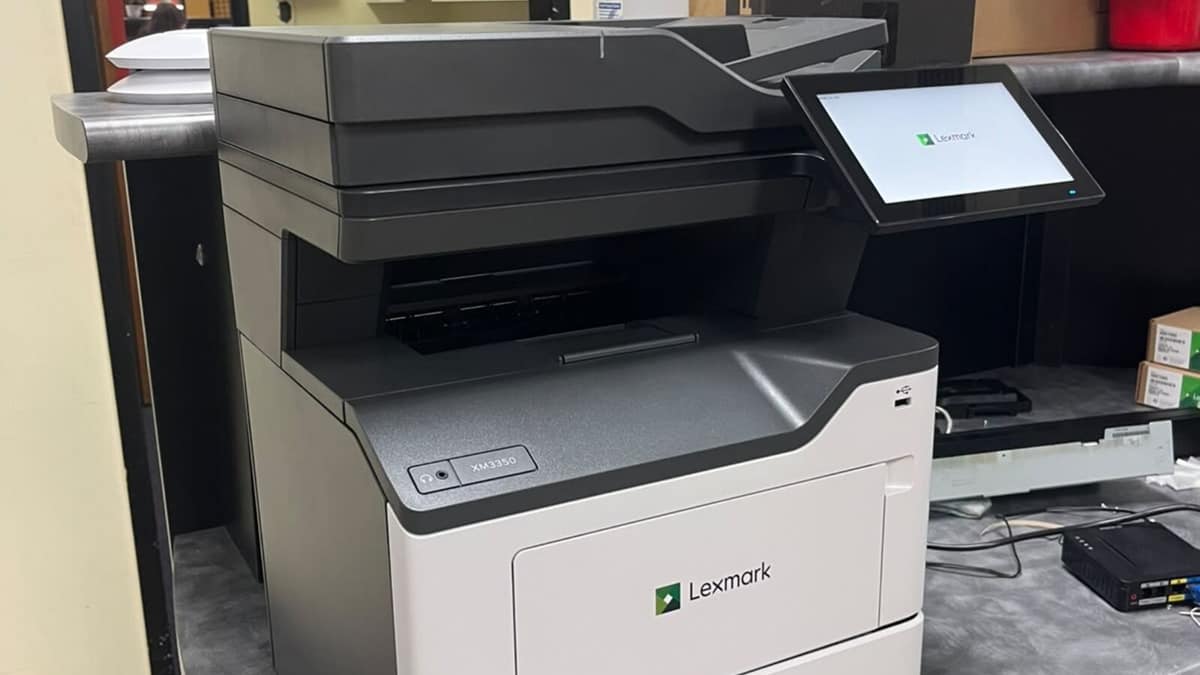
The short answer: most small businesses are best served by a multifunction laser printer, bought or leased to match their real monthly print volume, with networking, duplex and a document feeder. The trap to avoid is buying on sticker price. A cheap printer with expensive toner or ink costs far more over its life than a slightly dearer machine with a low cost per page. Here is how to choose well.
Laser or inkjet?
For a typical office, laser wins. Mono laser is the cheapest technology per page, often only a few cents, and it is fast and consistent at volume. A laser toner cartridge prints thousands of pages, where an ink cartridge prints a few hundred, which is why laser pulls ahead as soon as you print regularly.
Inkjet still has a place. A refillable ink-tank printer cuts running cost dramatically and suits low volumes or colour and photo-heavy work, and it uses less energy. But for text-heavy, day-to-day office printing, a laser multifunction is usually the right call.
| Factor | Laser | Inkjet |
|---|---|---|
| Cost per page | Lowest of any technology for mono, often only a few cents | Refillable ink-tank models cut running cost dramatically |
| Speed at volume | Fast and consistent | Suits lower volumes |
| Consumable life | A toner cartridge prints thousands of pages | An ink cartridge prints a few hundred pages |
| Energy use | Higher | Lower |
| Best for | Text-heavy, day-to-day office printing | Low volumes, colour and photo-heavy work |
Why most businesses want a multifunction
A multifunction printer, also called an all-in-one, combines printing, scanning, copying and often faxing in one machine. It replaces three or four devices, saving space, money and maintenance. Two features earn their keep:
- An automatic document feeder so you can scan or copy a stack of pages instead of one at a time. A single-pass feeder scans both sides at once.
- Automatic two-sided printing and scanning, which cuts paper use and digitises double-sided documents in one go.
The specs that actually matter
- Recommended monthly volume, not duty cycle. The duty cycle is the absolute maximum the hardware can survive. The recommended monthly volume is what it can comfortably sustain, usually around 10 percent of the duty cycle. Buy on the recommended volume. Pushing a printer past it is the most common cause of breakdowns.
- Speed. For a 3 to 10 person office, aim for 30 pages per minute or more.
- Paper capacity. A 250-sheet tray plus a document feeder is typical. Add a second tray if you print a lot.
- Networking. Look for Gigabit Ethernet and Wi-Fi, not a USB-only machine, plus mobile and cloud printing.
- Scanning destinations. Confirm scan to email and scan to a network folder from the machine’s own screen.
A simple way to size a printer: find your real monthly page count from the meter on your current machine, then match the recommended monthly volume to it.
Buy, lease or managed print?
- Buy outright if your volume is low, you have some IT capability, or you need a specific machine. Best for light users.
- Lease or managed print for predictable monthly costs with toner and servicing included, which suits medium to high volume offices that want regular upgrades. Managed print bills per page and bundles support, and usually works out cheaper to run once volume climbs.
Whichever you choose, compare on cost per page and total cost over a few years, not the purchase price. The cheapest printer on the shelf is often the most expensive to run. If leasing or managed print sounds like the right fit, that is exactly what our copiers and printers service covers.
The security gap most offices miss
A networked printer is a computer on your network, and it is one of the most overlooked. In one 2024 industry survey, 67 percent of organisations reported data loss linked to unsecured printing. The three biggest weaknesses are simple to fix:
- Default admin passwords, which are publicly known. Change them on day one.
- Outdated firmware. Keep it patched.
- Documents left in the tray. Secure print release holds a job until the person authenticates at the machine, which matters for anything confidential.
Because the printer sits on your network, it is only as secure as the network around it. Our networking service covers that side for Mackay businesses.
Matching the printer to your business
| Monthly volume | The right machine | How to pay for it |
|---|---|---|
| Light, under about 500 pages | Compact mono laser or an ink-tank multifunction | Buy outright |
| Medium, 500 to 2,000 pages | A4 laser multifunction at 30 pages per minute or more, with duplex and a feeder | Leasing or managed print starts to make sense |
| Heavy, 3,000 pages and up | High-volume laser multifunction with a large duty cycle and extra trays | Usually leased or on managed print |
Frequently asked questions
Is a laser or inkjet printer better for a small business?
Laser, for most offices. It has a lower cost per page, prints faster, and toner lasts far longer than ink. An ink-tank inkjet can suit low volumes or colour-heavy work, but laser wins for everyday office printing.
Should I buy or lease an office printer?
Buy if your volume is low and you want to own the machine. Lease or use managed print for predictable monthly costs with toner and servicing included, which suits medium to high volume offices. Compare on cost per page, not purchase price.
What printer specs matter most for a small business?
Recommended monthly volume that matches your real print count, 30 pages per minute or more, duplex, a document feeder, and proper networking with Gigabit Ethernet and Wi-Fi. Buy on recommended volume, not the headline duty cycle.
How do I work out my monthly print volume?
Read the page count meter on your current machine and compare readings a month apart. That number is your real monthly volume. Match it against the recommended monthly volume of any printer you are considering, not the duty cycle, because pushing a machine past its recommended volume is the most common cause of breakdowns.
Are office printers a security risk?
Yes. A networked printer is a computer on your network. Change the default password, keep firmware updated, and use secure print release so confidential documents do not sit in the tray.
Sources
- Cost per page and running costs, Toner Buzz
- Duty cycle versus recommended monthly volume, Crew-Tech
- Print security landscape 2024, Quocirca
What to do next
Choosing and running office print is exactly what we do. We help Mackay businesses pick the right machine, set it up securely on the network, and keep the toner and servicing handled so it just works.
Get printer advice for your office at /quote
Last reviewed June 2026.